Cron Jobs
Cron jobs run AI prompts on a schedule. They generate briefings, summaries, research reports, and more -- delivered to your inbox or written to files.
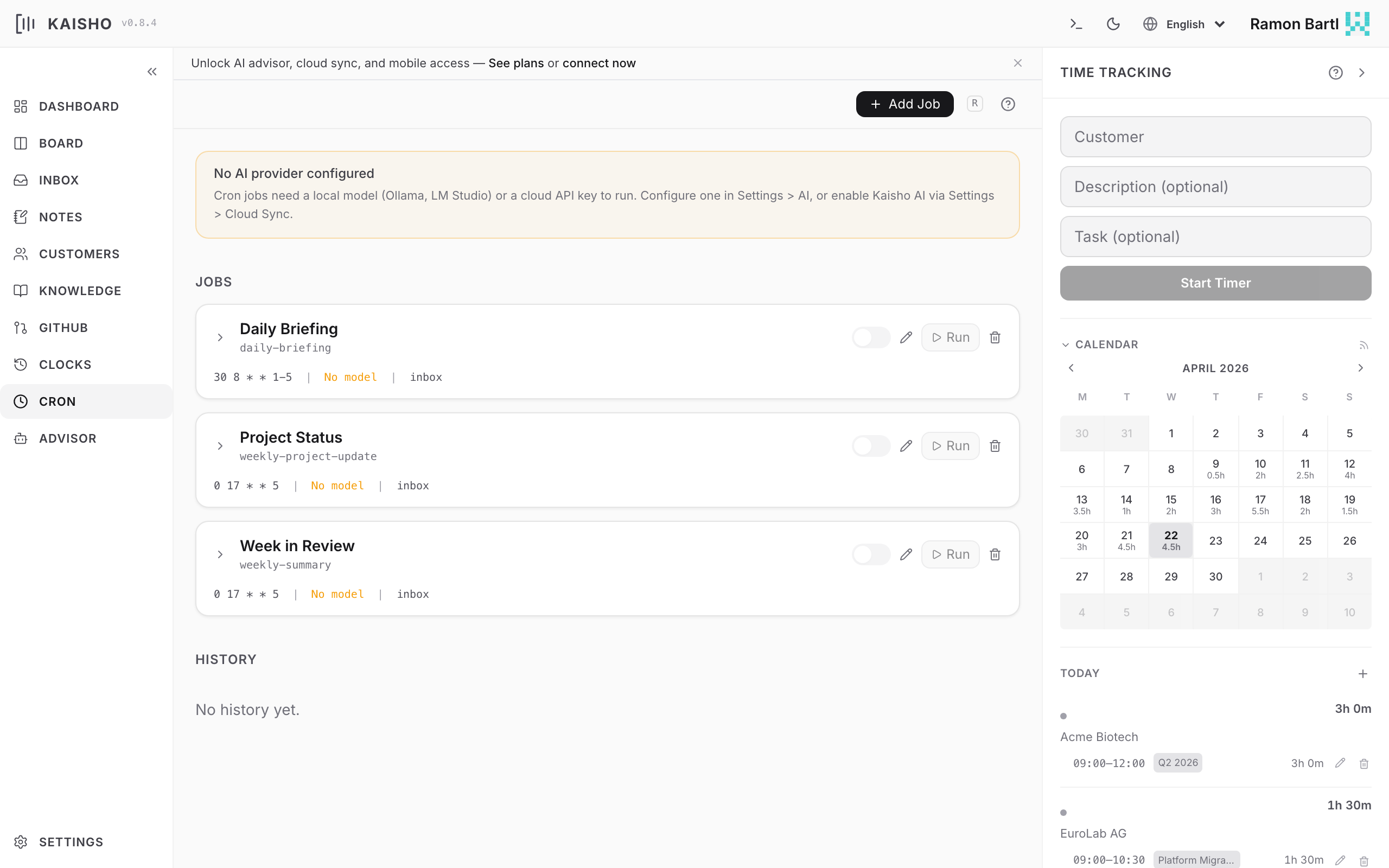
Since 1.3.0
Cron job templates and the context-injection layer shipped in 1.3.0; before that, jobs were free-form prompts without a structured way to weave in customer/task/clock data.
How Cron Jobs Work
- You define a job with a schedule (cron expression), a prompt template, and an output destination.
- APScheduler fires the job at the scheduled time.
- The executor loads the prompt, gathers context, and sends it to the configured AI model.
- The model can use all 43 tools (same as the advisor).
- The result goes to your inbox, a file, or stdout.
Default Jobs
Fresh profiles include two example jobs:
| Job | Schedule | Description |
|---|---|---|
daily-briefing | 8:30 Mon-Fri | Morning overview of tasks, inbox, budgets |
weekly-summary | 17:00 Friday | Week recap with hours, completed tasks |
Both are disabled by default. Enable them in Settings > Cron or:
Creating a Job
Open Cron in the sidebar. Click Add Job. Fill in:
- ID: unique identifier (e.g.,
weekly-report) - Name: display name
- Schedule: cron expression
- Model: AI model to use
- Prompt: the prompt template
- Output: where results go (
inboxor a file path)
Cron Expressions
Standard five-field cron syntax:
 ┌─── minute (0-59)
 │ ┌─── hour (0-23)
 │ │ ┌─── day of month (1-31)
 │ │ │ ┌─── month (1-12)
 │ │ │ │ ┌─── day of week (0-6, Mon=1)
 │ │ │ │ │
 * * * * *
Examples:
| Expression | Meaning |
|---|---|
30 8 * * 1-5 | 8:30 AM, Monday through Friday |
0 17 * * 5 | 5:00 PM every Friday |
0 9 1 * * | 9:00 AM on the 1st of each month |
*/30 * * * * | Every 30 minutes |
Prompt Templates
Prompts are Markdown files stored in prompts/ or the profile directory. They support YAML frontmatter for pre-fetch URLs:
---
fetch:
  - https://news.ycombinator.com/rss
---

Summarize the top tech news today. Focus on items relevant
to my current projects.

Context about my projects:
- Use the list_tasks tool to see what I'm working on
- Check my customers with list_customers
Template variables:
| Variable | Value |
|---|---|
{today} | Current date |
{fetch_results} | Content from fetched URLs |
Managing Jobs
kai cron list                    # List all jobs
kai cron show daily-briefing     # Show job details
kai cron trigger daily-briefing  # Run now
kai cron disable daily-briefing  # Pause
kai cron enable daily-briefing   # Resume
kai cron delete daily-briefing   # Remove
Execution History
View past runs with status, output, and error messages:
In the UI, the history pane shows sortable columns with execution results. Click a row to see the full output. Move outputs to inbox, tasks, notes, or the knowledge base.
Kaisho AI for cron jobs
To route a cron job through the Kaisho Cloud AI gateway, set its model field to kaisho:cron. The gateway picks the upstream model and meters tokens against your Sync+AI plan quota. There is no separate "use Kaisho AI" toggle — the model field is the single source of truth.
The cloud cron path runs an agentic loop with a restricted tool set (read + research only: fetch_url, transcribe_youtube, web_search, search_knowledge, read_knowledge_file). Destructive tools (delete_*, execute_cli, profile management) are not exposed to cron.
Pre-injected Kaisho context
Cron jobs with inject_context: true (the default) get a markdown block prepended to their prompt with the user's open tasks, recent clock entries, inbox items, customer budgets, and time insights. This lets briefing/summary/report templates work on any model — including those that cannot tool-call.
For news/research crons (e.g. HN digest, business scout) the local data isn't relevant; set inject_context: false in the job definition to skip it. This avoids shipping customer/budget data to the upstream LLM provider unnecessarily and saves tokens.
Templates
Default templates ship with templates/jobs.yaml:
| Template | Category | Inject context | Tools |
|---|---|---|---|
| daily-briefing | briefing | yes | none |
| weekly-summary | report | yes | none |
| weekly-project-update | report | yes | none |
| hn-ai-daily | news | no | none |
| weekly-scout | research | no | required |
weekly-scout requires a tool-capable model (Haiku 4.5 via kaisho:cron, or qwen3:32b / llama3.3:70b locally). Gemma family models do not tool-call and will fail this template.
Create new jobs from a template via the Cron view's "From Template" picker, or by asking the advisor: "Create a daily HN digest cron called my-hn".